TIMELINE OF REPAIRS
- July
15-20, 2006: Apple Store Service Request [redacted]. I brought the computer into the
Apple Store in Chandler, Arizona, complaining about a variety of problems,
including a broken sound card, erratic behavior when waking up from sleep,
kernel panics, crashes and other problems in core apps, general system
sluggishness, and physical sagging of the plastic casing around the
SuperDrive. (See July
2006.rtf, a
file which I created and left on my Desktop, highlighted in red, in order
to give the repair technician more detailed information about the
problems.)
The computer was sent to an off-site repair facility. The sound card was replaced, and the kernel panics ceased, but the other problems were not fixed. However, I did not bring the computer back in for almost a year, because it’s such a hassle to be computer-less, and the remaining problems, while annoying, were not debilitating.
- June
5-13, 2007: Apple Store Service Request [redacted]. I brought the computer into the
Apple Store in Knoxville, Tennessee, again listing a variety of problems,
including (again) erratic sleep behavior, general system sluggishness,
loose physical casing around the SuperDrive, and a faulty keyboard. (See June 2007.doc, which I printed out and
gave to the Apple Genius, and also left on my Desktop, highlighted in
red.)
The computer was again sent to an off-site repair facility. The repair technicians replaced the keyboard, wiped the hard drive, and reinstalled the OS. Oddly, they didn’t replace or fix the broken SuperDrive casing, but they did replace several other parts that I hadn’t complained about. As for the other issues, I was unable to immediately evaluate the effectiveness of the repairs, for reasons that are explained in the next paragraph.
- June
14-20, 2007: Apple Store Service Request [redacted]
(Repeat Repair). When I
brought the computer home on June 13, I promptly began setting up my newly
installed OS, moving Documents and Music over from my backup drive,
etc. Everything seemed fine
for a few hours. The screen
did make a brief, unexplained “flash” at one point, but I didn’t think
much of it. Then, all of a
sudden, the computer made a loud “POP!” noise, which sounded like a board
short-circuiting, and instantly powered off. All attempts to turn it back on failed. I tried different power outlets
and power supplies; I tried it with and without the battery. Nothing worked. So, on June 14, I brought it back
into the Apple Store Knoxville.
An Apple Genius confirmed that the computer would not turn on, and
it was sent back to the off-site repair center.
But then something very strange happened: en route to the repair center, the computer somehow mysteriously “fixed itself.” It had been completely broken, unable to turn on, when it left Knoxville; by the time it arrived in Houston, it was working fine. No one has been able to explain how this occurred. It was like the apparent catastrophic system failure of June 13 had never happened. So the repair technicians (finally) replaced the plastic around the SuperDrive and then sent it back without further repairs, since it was magically working again.
- July
12, 2007: Very soon after I got the
PowerBook back “for good” on June 20 after its two-week absence, it became
apparent that it still had serious problems. The fresh OS had not fixed the core-app
crashes, sleep problems and UI glitches, even though the hard drive had
been wiped clean and the OS had been installed from scratch (not with
copied applications or library files). So I began logging every error and issue, documenting
all the problems I was experiencing, and on July 12, I wrote up another
list of problems (July 2007.doc) and brought the computer back into the Apple
Store Knoxville.
An Apple Genius helped me solve one of the problems on the list, a strange Mail glitch. But as for the other, recurring problems, he said they “had to be” software-related, not hardware-related. (He ran Apple Hardware Test, and it showed nothing wrong.) I pointed out that we had just reinstalled the OS from scratch, and the problems had continued, but he nevertheless insisted that software or the OS was somehow to blame. He suggested I erase and reinstall the OS again, and see if that would fix it.
Because erasing & reinstalling is literally what I had just done, and it hadn’t helped, I decided at this point to contact Apple directly, because I refuse to keep running in circles and not fixing these same problems which have been happening for 15+ months now.
PROBLEMS MY POWERBOOK IS CURRENTLY HAVING
- Erratic
behavior when waking up from sleep.
I typically put my computer to sleep by simply closing the lid. Sometimes, it refuses to wake up, or otherwise behaves erratically. There is no apparent rhyme or reason to this behavior: it can happen when the computer has been asleep for a few minutes, or for several hours; when it’s running on wall power, or battery power; when USB peripherals are attached, or when they’re not; etc. And when the behavior does happen, it manifests itself in a variety of ways.
For example, on June 23—three days after I got it back with a freshly installed OS—I put the computer to sleep by closing the lid, and when I opened the lid and tried to wake it up, it was unresponsive. I had to manually turn the computer off & on again with the power button. I made a video to document the problem, which is on the attached CD-ROM as sleeperror1.mov. The same problem occurred again on July 5, and I made another video of it, sleeperror2.mov. It has occurred several other times as well.
On another occasion, on June 26, when I woke the computer from sleep after closing its lid, I found that it had spontaneously reset the screen brightness to zero brightness, so the screen was completely dark. This occurred again on July 4.
On June 28, closing the lid sent the computer into Safe Sleep, for no apparent reason. (The battery was not low, and the lid had only been closed for a few minutes.) This occurred again on July 16, while the computer was plugged into wall power, with the battery fully charged.
On July 14, the cursor disappeared for about 30 seconds after the computer woke up. Everything else appeared to be working fine; the cursor was simply missing. It then spontaneously reappeared.
On July 18, I experienced a combination of the June 23 issue and the June 26 issue: the computer refused to wake up, so I had to manually restart it, and then when it rebooted, the screen brightness was reset to one notch above zero. This combination of behaviors occurred again on July 19 and July 28.
In a separate occasion on July 19, the lid was fully closed for over an hour, but the computer apparently did not go to sleep. When I opened the lid, the screensaver was running, and the bottom of the computer was unusually warm.
Finally, on July 30, the computer made a “waking up sound” with the lid still closed when I unplugged an inactive USB device (a cell phone that I had been charging via USB). I then opened the lid and attempted to use the computer, but nothing appeared on the screen. I tried hitting various keys, including F2 to increase the screen brightness, but nothing worked. I had to manually turn the computer off & on to get it working again.
I emphasize that these sleep oddities are a sporadic problem—the computer doesn’t malfunction every time I wake it up, or even 10 percent of the time. Therefore, it may be difficult to reproduce the error. But that doesn’t mean it isn’t a real problem. I’ve done my best to document the problem when it does occur, so that you can understand my complaint. It happens often enough that it’s a real problem, because I can’t trust the computer to behave properly when waking up from sleep.
I have been noticing this problem since early 2006, and I have complained about it each time I’ve brought the computer in for repair. It is mentioned in July 2006.rtf, June 2007.doc and July 2007.doc, which are the documents that I brought in with my computer at each prior attempted repair.
- Crashes
in core applications.
This, too, is a problem I’ve been noticing since early 2006, but it has not yet been solved, even by wiping the hard drive and reinstalling the OS in July 2007.
For example, Safari “quit unexpectedly” for no obvious reason on June 22, June 29, July 7, July 8, July 25, July 28 and August 3; iPhoto quit immediately upon opening it on June 24; Mail quit while I wasn’t even actively using it (it was in the background) on June 27; the Finder quit in the middle of a standard Spotlight search on June 24; Firefox froze on July 9; Excel crashed as I was in the process of exiting it properly on July 27; Word crashed while I was writing this very letter, on August 4; and on July 22, System Preferences refused to open when I clicked it in the Dock, so I had to Force Quit it, after which it opened, but then froze while I was in the Date & Time window.
There have been other crashes, too, but those are the ones I’ve documented in my manual problem log.
In all cases, I wasn’t doing anything unusual that could help explain the crashes, such as using external devices or performing especially CPU-intensive tasks. The core applications just seem unstable and prone to crash, which I don’t expect from OS X!
As I mentioned, these crashes are not new. I complained about core-app crashes in July 2006.rtf, June 2007.doc and July 2007.doc.
- Strange
“screen flashes” and gibberish appearing on screen.
This is a more recent problem, but it reminds me of problems I had with my two severely defective 15-inch PowerBooks. In various different ways and contexts, my screen has recently been “flashing” and/or briefly—for a split second—displaying gibberish.
For instance, on July 17, I noticed that hiding the SHIFT key and the 0 key (i.e., the key combination that creates a closed-parenthesis symbol) was causing the screen to “flash” to white. I made a video of this, which can be seen at screen-flashes.mov.
On July 25, the screen “flashed” for a split second, getting much brighter—almost completely white—before returning to normal. This wasn’t caused by any particular key combination or other action by me; it happened apparently on its own.
On July 27, as I was scrolling through DrudgeReport.com in Safari, there was a sudden flash of what looked like garbled text or HTML of some kind in the browser window. It only appeared for a split second, so I didn’t get a good look at it, but it was clearly unrelated to the actual content of the Web page; it was plainly a glitch on my computer’s end.
Finally, on August 1, as I was scrolling from one iPhoto picture to another, a bunch of digital gibberish appeared for a split-second where the photo should be. The pattern looked sort of like a black-and-white bar code. But it then immediately disappeared and was replaced by the photo. This happened twice in the course of 10 minutes.
Then, a few minutes later, as I was cropping a photo, a small, strange yellow-and-red line appeared at the upper left-hand corner of the image while it was saving. The line disappeared after the image was saved. Because of the previous problems, I was making a screen-capture movie when this occurred: you can see it at iphoto-colorlines.mov.
These “screen flashes” will almost certainly be impossible to re-create, as they have occurred very sporadically. However, although they might seem like minor issues, I am very concerned about them because I fear they might foretell a more serious problem down the road. If these are the early-warning signs of something wrong with my video card, then it seems likely that they will ultimately get worse, not better.
- Unexplained
hardware problems.
As mentioned above, under “TIMELINE OF REPAIRS,” my computer experienced an apparent catastrophic system failure on June 13—the very day I got it back from its initial June 2007 repair. It made a loud “POP!” sound, immediately powered down, and refused to turn back on. This problem “fixed itself” en route to the repair center in Houston, but it continues to worry me, because in my experience, computers that “fix themselves” with no explanation also tend to “break themselves” with no explanation later on. So I’m concerned this unexplained hardware glitch may resurface later on.
Similarly, I’m worried about a problem that I first complained about in June 2007.doc: a loud “grinding” noise that occurred frequently in May 2007 before “fixing itself.” The noise sounded like it was coming from underneath the left speaker or thereabouts. It was consistently happening for several weeks in May, and it worries me because it was a very “bad” sound, the sort of thing you never want to hear coming from your computer – it sounded like something was going mechanically wrong “under the hood.” I made several audio recordings of the sound using WireTap Pro, which are on the CD-ROM as grinding1.aifc, grinding2.aiff, and grinding3.aifc.
Both the June 13 hardware failure and the May “grinding noise” problem will be impossible to reproduce, because they are no longer happening. But again, I worry that they might eventually recur. I also worry that the “grinding” might have caused some physical damage that is relevant to other problems. More broadly, these are just two more examples of a computer that keeps suffering one glitch after another.
- Keyboard
malfunctions.
This is another example of a problem that mysteriously came and went. On July 22, when I attempted to type something on my computer, I found that it was stuck in both “CAPS LOCK” and “NUM LOCK” mode, even though I had not pressed those buttons. The green lights indicating that “CAPS LOCK” and “NUM LOCK” are enabled were not illuminated, but the computer was acting like they were. Restarting the computer did not fix it. The only solution was to actually enable both “CAPS LOCK” and “NUM LOCK,” so that the green lights came on! This reversed the computer’s faulty behavior, “fixing” it. I used it this way for several days, with the green lights constantly on. Then, after a few days, the lights mysteriously turned themselves off and the computer returned to normal. Everything is working fine now, but again, I wonder if this is indicative of a broader problem, or if it might recur. Also, keep in mind, the keyboard was just replaced, so it’s particularly alarming that something like this would have happened.
Then on August 2, a different kind of keyboard glitch occurred—or perhaps I should call it a Finder glitch. All of a sudden, I was unable to type anything in the Finder. I could type in other applications fine, but not in Finder. For example, when I highlighted a filename, I couldn’t change it, nor could I type anything in the Info window. I had to Force Quit Finder in order to fix this problem. I created a video of this, which can be viewed at finder-notype.avi.
- Weird
UI glitches in core applications.
In the grand scheme of things, these are minor problems. But in combination with everything else, I think they’re worth mentioning because they demonstrate the computer’s overall bugginess. Keep in mind, all of these examples occurred after the hard drive was erased and the OS reinstalled from scratch.
On June 25, as I was using Safari with Mail in the background, the menu bars for the two applications briefly got mixed up:

Then on July 1, as I was using Calculator, the program’s interface partially disappeared:
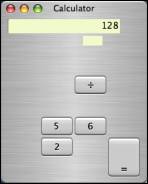
This same Calculator glitch has occurred several times since. On July 26, I created a screen-capture video of it, which can be seen at calculator.mov.
On July 2, a single file appeared in triplicate in TextEdit’s “Open Recent” menu:
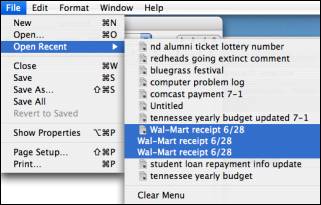
Finally, several times since July 11, the “carrots” in Dictionary and Thesaurus have malfunctioned. This problem is difficult to describe, but can be best understood by watching the screen-capture video that I made on July 30, called dictionary.mov.
As I mentioned, these UI glitches are relatively minor issues, and I wouldn’t
be complaining about them at all if it weren’t for the other, more serious
problems. However, given
everything else that’s happening, I think they’re relevant.
· Other
miscellaneous problems.
I’ve noticed at least one instance
of iTunes mysteriously “skipping” during playback. I’ve had some unexplained (and inconsistent) difficulty
getting “sparse disk images” to mount.
On one occasion, the screen brightness reset to zero when I restarted
the computer. Also, the
“Automatically adjust brightness as ambient light changes” setting in the
System Preferences Display menu has, on least two occasions, turned itself back
on after I had turned it off.
Conversely, on one occasion, the “Show modem status in menu bar” setting
turned itself off after I had
turned it on.
I am not trying to be unreasonable here, and I don’t believe that I am. I realize that some of these problems may seem like “small potatoes.” Even the more serious problems might be tolerable in isolation. However, the combined result of these multiple, persistent problems is that the computer simply is not performing up to the standard that I would expect from a $2,500 professional computer. In some ways, it reminds me more of my old, problem-plagued Dell laptop with Windows 98 than of a high-quality Apple computer with the world-class OS X operating system.
Nor have the results of my attempts to get the computer repaired lived up to the $350 extended warranty that I paid for. I certainly didn’t buy this PowerBook and AppleCare with the expectation that I would have to deal for this length of time with this many bugs, glitches, malfunctions, and unexplained, unresolved problems. I expected, and continue to expect, more from Apple products and Apple support than I might from other companies. So I hope these issues can finally be resolved, either by a real, full-fledged diagnosis and repair (not a temporary patch like reinstalling the OS, which has already been proven not to work), or else by replacing the computer altogether.